407-984-5529 [email protected] New Prague, MN 56071
Device prep

How to find your laptop model number

A step-by-step guide for Windows, macOS, and Linux, so you can fill in the model field on your quote with confidence.

The Three Fastest Ways

Stuck on the model number field while getting a quote, hunting for the right drivers, or checking whether an upgrade is compatible? Your laptop's exact model number is the starting point, and it isn't always obvious where to look. These three checks cover most laptops:

  • On the laptop body. Flip the laptop over. The model is almost always on a sticker or etched into the case, labelled “Model”, “Product”, or “M/N”.
  • In Windows. Click Start, type System Information, open the app, and read the “System Model” line.
  • On a Mac. Click the Apple logo in the top-left corner and choose “About This Mac”. The model name is shown right there.
If none of those work, the detailed methods below cover worn stickers, second-hand laptops, and machines that will not boot.

Why Your Model Number Matters

Your model number, sometimes called the product name or system model, identifies the manufacturer, series, and configuration of your machine. That matters when you are:

  • Getting an accurate quote when selling your laptop, since pricing depends on the exact model
  • Downloading the correct drivers or software from the manufacturer
  • Checking warranty status or whether an accessory is compatible
  • Troubleshooting a hardware issue with tech support
Sticker worn off? If you bought the laptop second-hand or the label has rubbed away, the software methods below will get you there.

Method 1: Check the Laptop Itself

The simplest approach works on every operating system. Most manufacturers print or engrave the model number directly on the case.
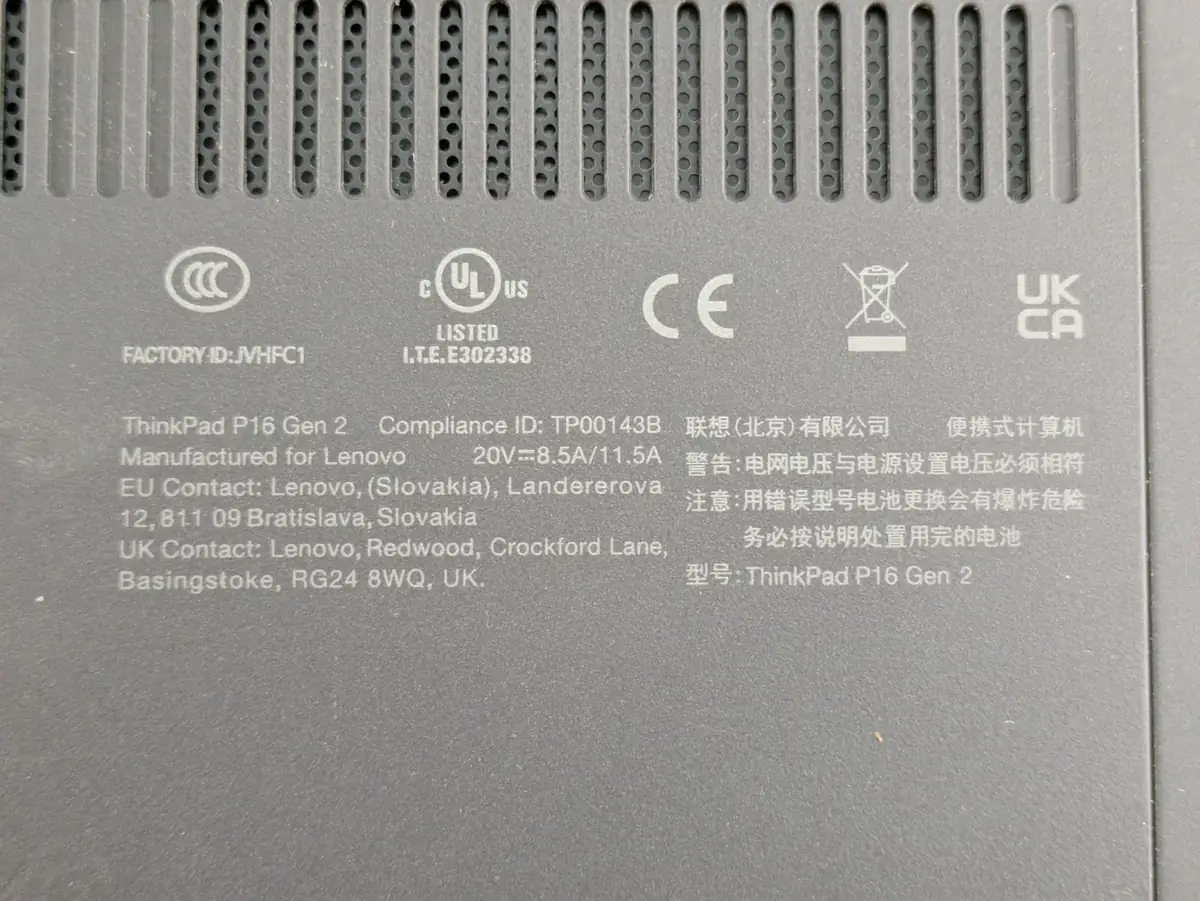
  1. Power off the laptop and unplug it.
  2. Turn it upside down and look for a white or silver sticker, or text printed or etched directly into the case, near the center or edges.
  3. Find the line labelled Model, Product, or M/N. It usually looks something like “Inspiron 15 5000” or “XPS 13 9310”.
  4. If the battery is removable, check the battery compartment as well.
  5. Still nothing? Check the original box or the user manual.
The underside of a Lenovo ThinkPad showing the model name ThinkPad P16 Gen 2 printed beside the regulatory certification marks
On this ThinkPad the model sits in the regulatory block on the underside, printed next to the compliance marks. Look for the name of the range followed by a size or generation.

Method 2: Windows Tools

If the sticker is missing or unreadable, Windows 10 and 11 can tell you directly.

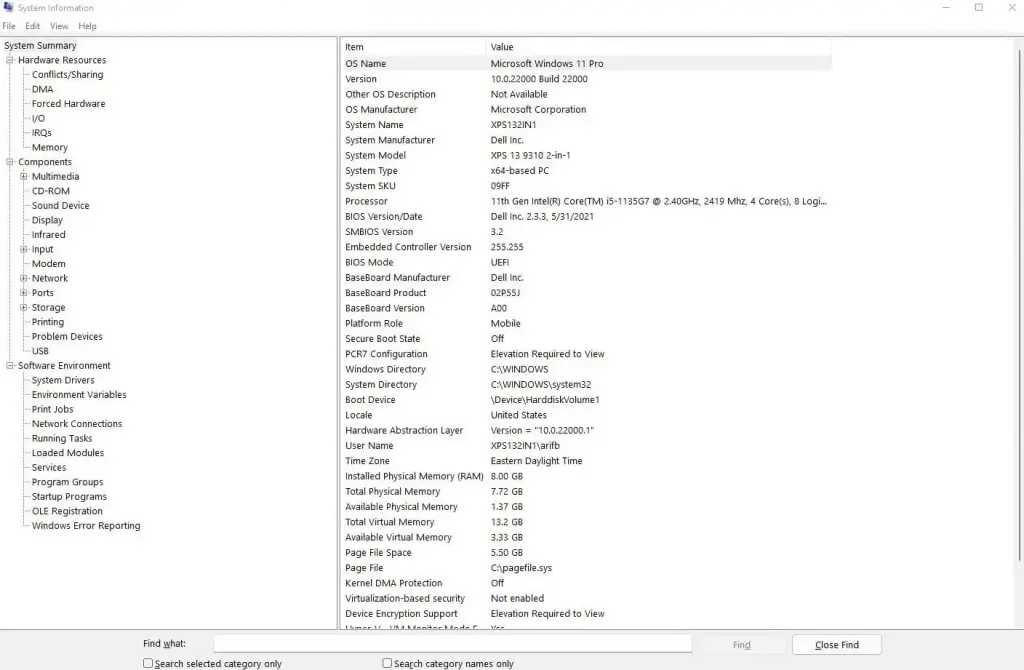
System Information app

  1. Press Windows + S, type System Information, and open the app.
  2. Select System Summary in the left pane.
  3. Read the System Model line on the right. That is your model number.
The Windows System Information app with the System Model line highlighted
In System Information, the System Model row gives the model directly, here an XPS 13 9310 2-in-1.

Command Prompt

  1. Press Windows + S, type cmd, right-click Command Prompt, and choose Run as administrator.
  2. Enter wmic csproduct get name and press Enter.
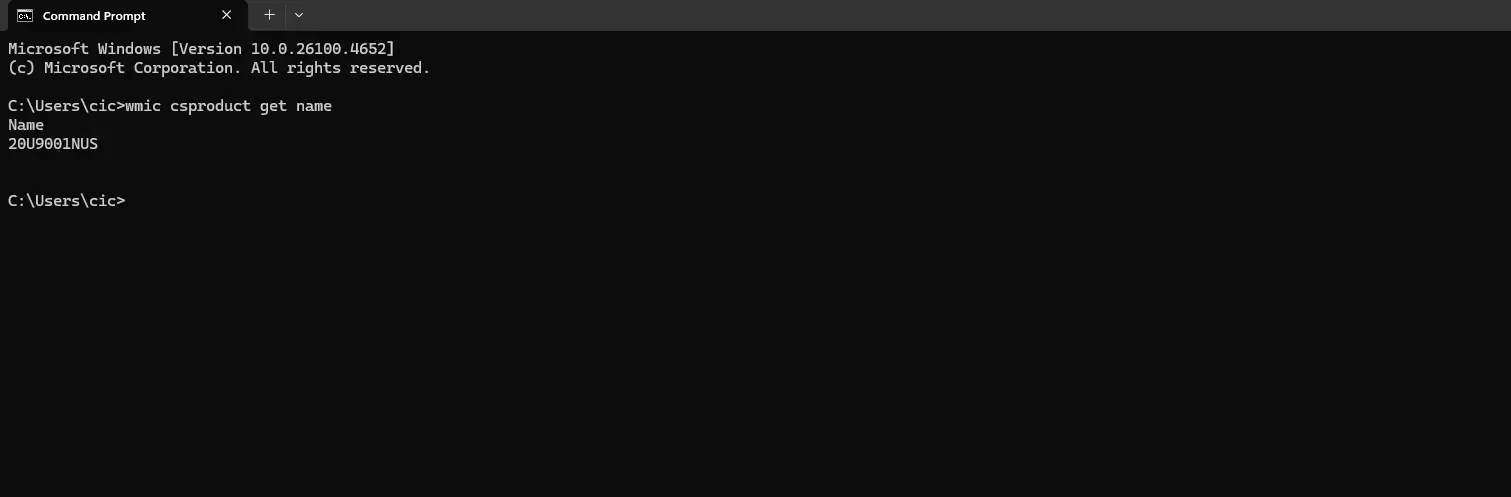
  3. Your model number appears just below the command.
A Windows Command Prompt window running wmic csproduct get name and returning the model number
The command returns the model on its own line, which is handy if you need to copy it exactly.

Method 3: macOS

On a MacBook it takes two clicks.

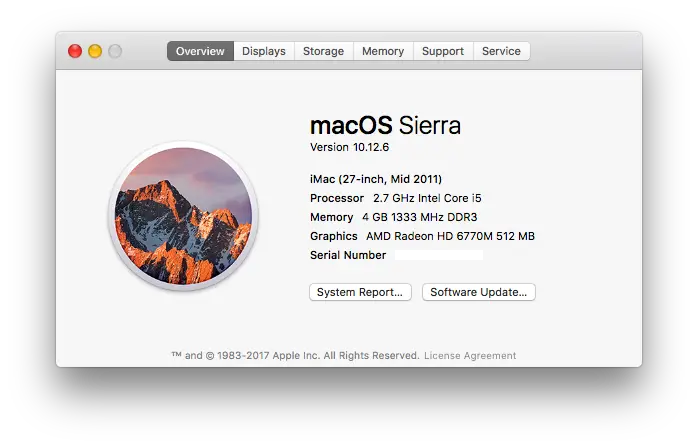
  1. Click the Apple logo in the top-left corner.
  2. Select About This Mac.
  3. The overview shows your model, for example “MacBook Pro (13-inch, M1, 2020)”. You can confirm it against Apple's guide to identifying MacBook models.
The About This Mac window on macOS showing the model name and year
About This Mac lists the model and year on the Overview tab. The layout differs between macOS versions, but the model line is always near the top.

Method 4: Linux

On Linux, one terminal command does the job.

  1. Open Terminal with Ctrl + Alt + T.
  2. Enter sudo dmidecode -s system-product-name and press Enter, then supply your password if prompted.
  3. Your model number is returned on the next line.

If you want more detail, such as the manufacturer and serial number alongside the model, run sudo dmidecode | grep -A 9 "System Information" instead.
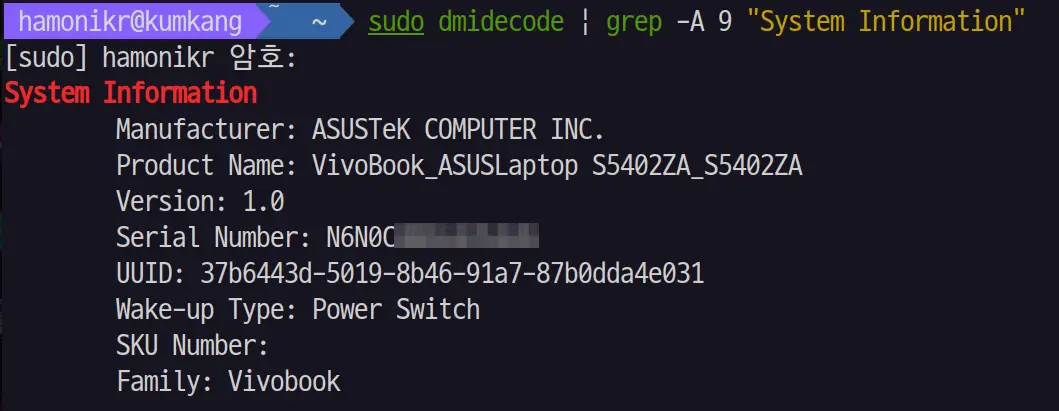
A Linux terminal showing dmidecode output with the manufacturer, product name, version and serial number
The fuller command prints the manufacturer and product name together, which is useful when the model alone is ambiguous.
At a glance

Which method works on your system

Not every method is available on every operating system. This is the quickest way to pick one.

MethodWindowsmacOSLinuxEase
Physical stickerEasy
System menu or appN/AEasy
Command lineN/AMedium
BIOS or UEFIN/AMedium

If You Are Still Stuck

  • Sticker missing or worn? Use one of the software methods above, or look up your serial number on the manufacturer's site.
  • Laptop will not boot? Use the physical inspection method, or check the BIOS or UEFI screen.
  • Brand tools can help. HP Support Assistant and Lenovo's “Detect Product” tool both identify your machine automatically.

You can also go straight to your manufacturer's own guide using the links further down this page.

Common questions

Model numbers, explained

Model Number Questions

Is the model number the same as the serial number?

No. The model is the product line, like “Latitude 5490”, while the serial number is unique to your specific unit. Custom-built laptops may not have a standard model at all, in which case you can check the motherboard with a tool like CPU-Z.

Can I find the model number without turning on the laptop?

Yes. The physical inspection method works with the laptop powered off. Check the sticker on the bottom of the case, the original box, or the user manual.

Why can't I find it in the BIOS?

BIOS access keys vary by manufacturer. F2, F10, and Del are the most common, but check your manufacturer's support site for the right key for your model.

Keep reading

Before you ship

Manufacturer guides

Find your model on the official site

If our guide did not get you there, these are the manufacturers' own instructions for locating a model or serial number.

Got your model number?

Enter it on the quote page for an instant, no-obligation offer, then ship free and get paid fast.

Get your quote